Beach White: A Font That Brings Coastal Charm to Digital Design
As a web designer, I’ve spent countless hours choosing the right typeface to complement a brand’s personality and enhance user experience. Recently, I tested Beach White in a few real-world digital projects, and it quickly became one of my go-to choices for adding a fresh, approachable vibe to online spaces.
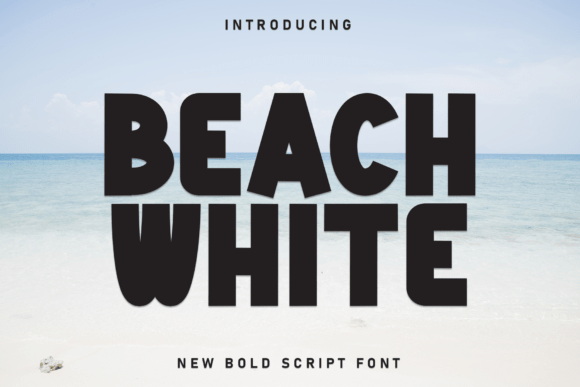
Beach White is a casual display font that blends modern simplicity with a playful, approachable vibe. Its clean shapes, soft edges, and well-balanced letterforms give it a relaxed yet refined look. It feels like a warm breeze on a summer day—inviting, easygoing, and just the right amount of charm for any digital design.
Testing Beach White in Real Web Layouts
I first used Beach White in a hero section for a boutique online store. The font’s light, airy feel worked beautifully against a pastel background, creating a welcoming atmosphere that immediately made users feel at ease. It was perfect for the store’s tagline and product titles, adding a touch of personality without overwhelming the design.
Next, I tried using it on a landing page for a new course. The headline, “Unlock Your Creative Potential,” looked stunning in Beach White. It drew the eye and set the tone for an engaging user experience. I paired it with a clean sans serif font for body text, which helped maintain readability while keeping the design visually interesting.
Readability and Responsiveness
One of the most important aspects of any web font is its readability, especially on different screen sizes. I tested Beach White on both desktop and mobile devices, and it performed admirably. On smaller screens, the font still held up well, maintaining clarity and legibility even when scaled down.
I also checked how it looked on dark and light backgrounds. On a dark background, the font had a nice contrast that made it stand out, while on a light background, it felt more subtle and elegant. This versatility makes it a great choice for a wide range of design scenarios.
For image overlays, Beach White worked exceptionally well. Whether it was over a beach scene or a product shot, the font blended seamlessly, adding a touch of style without competing with the visual elements behind it.
Font Pairing and Branding
When pairing fonts, I found that Beach White pairs best with clean sans serif fonts for body copy. This creates a balanced look where the display font can shine without overshadowing the rest of the content. For example, pairing it with a simple sans serif like Montserrat or Lato gives a modern, professional feel that works well for both creative and commercial brands.
If you’re aiming for a more editorial or luxury vibe, consider pairing it with a serif font for headings. This combination adds depth and sophistication, making it ideal for portfolio sites, blog headers, or brand kits.
For branding purposes, Beach White is a fantastic option for logos, website headers, and social media graphics. Its friendly and approachable nature makes it perfect for lifestyle brands, creative studios, and boutique websites looking to connect with their audience on a personal level.
Considerations for Use
While Beach White is incredibly versatile, it’s not always the best choice for every situation. Because it’s a decorative display font, it may not be ideal for long body copy or dense information sections. It’s better suited for short phrases, headlines, buttons, and decorative accents.
Also, if you’re designing for accessibility-heavy interfaces or need a font that works well in form labels and navigation menus, you might want to consider a more traditional sans serif or serif font instead. Beach White’s soft edges and playful style are best reserved for areas where visual appeal takes precedence over function.
Before using Beach White on a client project or commercial site, make sure to check the included styles, alternates, ligatures, swashes, weights, and file formats. These features can add extra value to your designs and help you achieve the exact look you’re going for.
Final Thoughts on Beach White
Overall, Beach White is a delightful addition to any designer’s toolkit. Its blend of modern simplicity and playful charm makes it perfect for a variety of digital applications, from landing pages to brand assets. Whether you’re building a creative portfolio, launching a new online store, or refreshing your blog, this font has the potential to elevate your design and create a more engaging user experience.
With its clean lines, soft edges, and approachable vibe, Beach White is a font that brings warmth and character to any digital space. It’s not just a typeface—it’s a mood, a feeling, and a powerful tool for designers who want to connect with their audience in a meaningful way.